Dashboard Widgets
The widgets can be personalised to your own preferences based on which tasks you are currently working on. This can be adjusted at anytime
Please note: Any changes you make to your dashboard will NOT affect anyone else’s dashboard.

To change your dashboard widgets, select the cog on the desired widget.

My Sites Map
The map will show you all sites assigned to you and this can be filtered to various statuses.
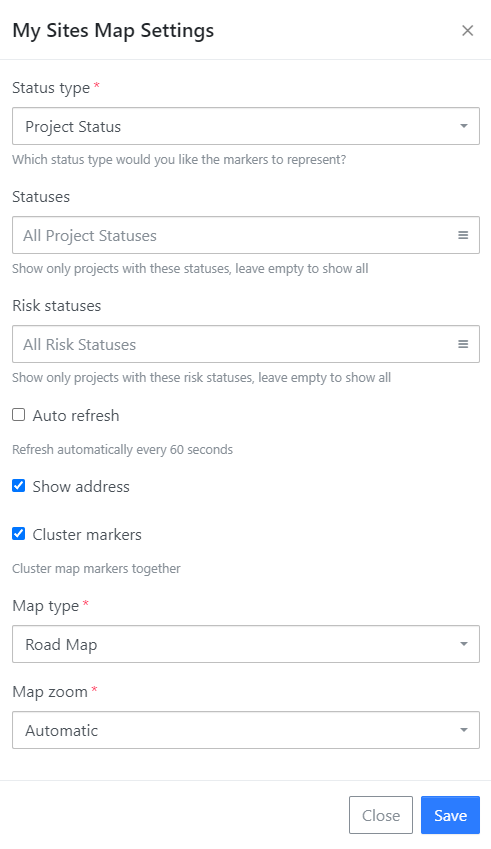
Status Type - Which status type would you like the markers to display, project or risk.
Statuses - Choose to see all statuses or specific ones such as available, attention etc.
Risk Status - This is to show any risk that expired or due to expire or both.
Auto Refresh - Selecting this will refresh the map every 60 seconds.
Show Address - Display the address of the site.
Cluster Markers - Cluster the site together in an a close area.
Map Type - You can choose to view the map as a road, satellite or hybrid.
Map Zoom - Change how you can see the map view.
My Sites Settings
This will show you a list of sites assigned to you.

Status Type - Which status type would you like the markers to display, project or risk.
Statuses - Choose to see all statuses or specific ones such as available, attention etc.
Risk Status - This is to show any risk that expired or due to expire or both.
Records per Page - Select how many records you would to view per page.
Auto Refresh - Selecting this will refresh the map every 60 seconds.
Show Address - Display the address of the site.
My Alert Settings
Any alerts linked to yourself will show here.

Groups - Choose to view alerts from all groups or from selected groups.
Only New Alerts - Only new alerts will show or de-select for all to be viewed.
Records per Page - Select how many records you would to view per page.
Auto Refresh - Selecting this will refresh the map every 60 seconds.
My Form Submissions Settings
Any forms submitted by yourself will be listed here.

Steps - View particular steps of a form.
Forms - Opt which specific forms you would like to view.
Order by - Choose to set the order by when the form was created or last updated.
From - Select a date from when you would like to see submissions from.
Records per Page - Select how many records you would to view per page.
Auto Refresh - Selecting this will refresh the map every 60 seconds.
My Alerts, Bulletins Pending and My Teams
Any alerts, bulletins or teams that you are assigned to will show here.

You can set these widgets to auto refresh every 60 seconds if they update regularly.